Sunday, September 11, 2011

WonderLogin - Windows 7 login screen changer
A simple tweaking software that can be used to change the Windows 7
login screen with a click of a button. No installation is required, just
download it and use it!.

Download from here

Download from here
Thursday, October 7, 2010
Your First Live Hacking Technique
There are many hacking techniques used for hacking a website. Here i am giving you a taste of SQL Injection method. SQL, OS, and LDAP injections occur when untrusted data is sent to an interpreter as part of a command or query. We can trick the interpreter into executing unintended commands. So, follow the below steps carefully. Now most of the sites are designed with SQL Injection in mind, hence the below method only works for poorly designed websites.
1) Go to Google and search for vulnerable ASP sites using "inurl:adminlogin.asp"

2) Choose a result
3) You will get a login window similar like this, use below data to login
Username : admin (always its admin)
Password : 'or'1'='1
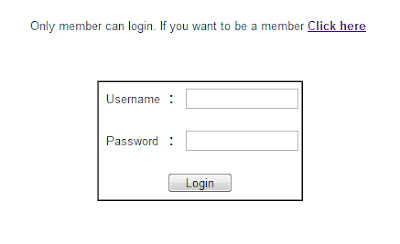
4) If you are lucky, you will be redirected to the Admin Panel

5) Finished, you hacked a website!
the theory behind this hack is explained below,
SQL injection is the result of weak coding. Analyzing the above example, the site uses a SQL statement similar below to access and compare username and password from the database.
1) Go to Google and search for vulnerable ASP sites using "inurl:adminlogin.asp"

2) Choose a result
3) You will get a login window similar like this, use below data to login
Username : admin (always its admin)
Password : 'or'1'='1

4) If you are lucky, you will be redirected to the Admin Panel

5) Finished, you hacked a website!
the theory behind this hack is explained below,
SQL injection is the result of weak coding. Analyzing the above example, the site uses a SQL statement similar below to access and compare username and password from the database.
SELECT username,pwd FROM members WHERE 'username'='given username' AND 'pwd'='given password'
SELECT username,pwd FROM members WHERE 'username'='admin' AND 'pwd'=''or'1'='1'So 1 = 1 will be always true and it proceeds the login. As for your knowledge it will not work with websites made of PHP. I will explain other techniques like XSS attacks in coming days. Happy Hacking!
Iconfinder.com - Search Engine for Icons

Iconfinder.com provides high quality icons for web designers and developers in an easy and efficient way. This is the best place to search, sort, filter, and find icons for any occasion. At the time of this writing the site currently has 318,060 icons in its database!

More than 100000 free icons in one place and you can download all the free icons in PNG or ICO format.

It have a nice filtering option that lets you choose to show only icons that can be used commercially, commercial that doesn’t require a back link or all icons. You can also change the background color of the icons to white, black, or grey. This will let you see what they look like on your site or application.
You can additionally filter the icons by size anywhere from 0 to 512px. This helps you find the proper size without having to re-size and possibly pixelate an icon. If you want to see more icons per page, it gives you the option to see 18, 24 or 48 icons per page.
If you are a firefox user there is an add-on available for iconfiner.com, Install it from here.
Wednesday, October 6, 2010
Viewing Live Webcams Using Google!

inurl:/view.shtml
or
intitle:”Live View / – AXIS” | inurl:view/view.shtml
The above query will reveal IP network web cameras that able to transmit live footage or individual images across the Internet from Axis Communications.However, contrary to popular believe, most of these webcams found by this trick is naturally meant for public viewing, and normally linked from a public website. Those private webcams attached to PC or used at the living room or bedroom or bathroom are normally won’t be able to find unless the owners purposely let Google crawl the link.
here is more queries,
inurl:ViewerFrame?Mode=
inurl:ViewerFrame?Mode=Refresh
inurl:axis-cgi/jpg
inurl:axis-cgi/mjpg (motion-JPEG)
inurl:view/indexFrame.shtml
inurl:view/index.shtml
inurl:view/view.shtml
liveapplet
intitle:”live view” intitle:axis
intitle:liveapplet
allintitle:”Network Camera NetworkCamera”
intitle:axis intitle:”video server”
intitle:liveapplet inurl:LvAppl
intitle:”EvoCam” inurl:”webcam.html”
intitle:”Live NetSnap Cam-Server feed”
intitle:”Live View / – AXIS”
intitle:”Live View / – AXIS 206M”
intitle:”Live View / – AXIS 206W”
intitle:”Live View / – AXIS 210?
inurl:indexFrame.shtml Axis
inurl:”MultiCameraFrame?Mode=Motion”
intitle:start inurl:cgistart
intitle:”WJ-NT104 Main Page”
intext:”MOBOTIX M1? intext:”Open Menu”
intext:”MOBOTIX M10? intext:”Open Menu”
intext:”MOBOTIX D10? intext:”Open Menu”
intitle:snc-z20 inurl:home/
intitle:snc-cs3 inurl:home/
intitle:snc-rz30 inurl:home/
intitle:”sony network camera snc-p1?
intitle:”sony network camera snc-m1?
site:.viewnetcam.com -www.viewnetcam.com
intitle:”Toshiba Network Camera” user login
intitle:”netcam live image”
intitle:”i-Catcher Console – Web Monitor”
www.drakepeak.net have built a database of live cameras found on the Internet. The database can be accessed directly at: http://www.drakepeak.net/index.php?content=livecams
Tuesday, October 5, 2010
SyntaxHighlighter for your Website/Blog

Here's the simple step by step on how to add it to your Blogger.
1) Login to your Blogger account, go to Design tab and click Edit HTML link.
2) Before editing HTML, take a Backup copy of your template
3) Copy the code below
<link href='http://alexgorbatchev.com/pub/sh/current/styles/shCore.css' rel='stylesheet' type='text/css'/>
<link href='http://alexgorbatchev.com/pub/sh/current/styles/shThemeDefault.css' rel='stylesheet' type='text/css'/>
<script src='http://alexgorbatchev.com/pub/sh/current/scripts/shCore.js' type='text/javascript'/>
<script src='http://alexgorbatchev.com/pub/sh/current/scripts/shAutoloader.js' type='text/javascript'/>
<script type='text/javascript'>
function path()
{
var args = arguments,
result = []
;
for(var i = 0; i < args.length; i++)
result.push(args[i].replace("@", "http://alexgorbatchev.com/pub/sh/current/scripts/"));
return result
};
SyntaxHighlighter.autoloader.apply(null, path(
'applescript @shBrushAppleScript.js',
'actionscript3 as3 @shBrushAS3.js',
'bash shell @shBrushBash.js',
'coldfusion cf @shBrushColdFusion.js',
'cpp c @shBrushCpp.js',
'c# c-sharp csharp @shBrushCSharp.js',
'css @shBrushCss.js',
'delphi pascal @shBrushDelphi.js',
'diff patch pas @shBrushDiff.js',
'erl erlang @shBrushErlang.js',
'groovy @shBrushGroovy.js',
'java @shBrushJava.js',
'jfx javafx @shBrushJavaFX.js',
'js jscript javascript @shBrushJScript.js',
'perl pl @shBrushPerl.js',
'php @shBrushPhp.js',
'text plain @shBrushPlain.js',
'py python @shBrushPython.js',
'ruby rails ror rb @shBrushRuby.js',
'sass scss @shBrushSass.js',
'scala @shBrushScala.js',
'sql @shBrushSql.js',
'vb vbnet @shBrushVb.js',
'xml xhtml xslt html @shBrushXml.js'
));
SyntaxHighlighter.config.bloggerMode = true;
SyntaxHighlighter.all();
</script>
<!-- Syntax Highlighter-->
3) search for </body> tag, then paste the code before the tag.
<!-- paste the code here -->

</body>
4) Click 'Save Template'. If everything goes right it will be saved successfully
5) Create a new post, click 'Edit Html' and past the code below and publish
<pre class="brush: js">
/**
 * SyntaxHighlighter
 */
function foo()
{
 if (counter <= 10)return;
 // it works!
}
</pre>
If everything goes right, the source code that you've posted will get syntax highlighted in JavaScript.
Note:
- In Blogger all < must be replaced with < This will ensure correct rendering.
- None Blogger users can delete SyntaxHighlighter.config.bloggerMode = true;
- You can change the theme by modifying
<link href="http://alexgorbatchev.com/pub/sh/current/styles/shThemeDefault.css" rel="stylesheet" type="text/css" />
Available themes are shThemeDjango.css, shThemeEclipse.css, shThemeEmacs.css, shThemeFadeToGrey.css, shThemeMidnight.css, shThemeRDark.css
Sunday, October 3, 2010
Install Windows 7 From USB Drive

Now you can install your Windows 7 from a USB drive. Yes, Microsoft made a handy tool for creating bootable Windows 7 USB/DVD disk from a Windows 7 ISO file. see here
Note: Make sure you are already installed .NET 2.0 and Microsoft Image Mastering API v2
Usage Instruction:
- Open Windows 7 USB/DVD Download Tool
- In the Source File box, type the name and path of your Windows 7 ISO file, or click Browse and select the file from the Open dialog box. Click Next.
- Select USB Device to create a copy on a USB flash drive or select DVD disk to create a copy on a DVD disk.
- If you are copying the file to a USB flash drive, select your USB device in the drop-down list and click Begin copying. If you are copying the file up to a DVD, click Begin burning.
- You are ready to use your USB/DVD!
Friday, October 23, 2009
How to Download Torrent Files Without a Torrent Client!

Now you can download torrent files without having a torrent client on your computer. If you don’t want the torrent clients eating up your disk space or using any public computer where you are not allowed to install any torrent client, you can take help of a website to download torrent files without a torrent client. Simply provide the link to the torrent metafile and click submit, your torrent files will get downloaded on your system like you are downing a normal file from any website.
Bitlet allows people to download torrent files without installing any torrent client. It uses a technology that downloads the torrent file on to it’s server first and then allows you to download your torrent files like any HTTP download. Too cool, isn’t it?
You can go to various torrent sites to look for a torrent file. I recommended to use Mininova, Torrentz, these sites load time is faster and having a loads of torrent files in it’s database. Simply search for you favourite torrent file and copy it’s location. Go to Bitlet and paste the URL. Hit submit and it will start downloading your torrent file. As soon as it downloads the torrent file on to it’s server, you will be able to download the file on your computer. when Bitlet finishes your torrents download, you would have been done with your file download also. As simple as that. This supports download resuming also.
So, start using this web service to download your torrent files from the web. If you are not getting better speed while downloading with your torrent client, you can use this service to download your files at a better speed.
Monday, July 20, 2009
IE7 Installation: Bypassing Genuine Windows Validation

At the time i am writing this article, many of you may be facing validation problem when installing IE7. Genuine validation is the process of checking whether your copy of Windows is pirated or not, so for every products or even for windows updates released by Microsoft requires validation before downloading. Hackers are very close to Windows products by this and other reasons. Here is one of the IE7 validation bypassing hack from a list of hacks! (only for educational purposes)
Requirements
- Windows XP SP2 or Higher
- Internet Explorer 7 Setup
- WinRAR (or any compatible one)
- normaliz.dll (Download)
- iecustom.dll (Download)
Installation
- Extract downloaded IE7 Setup (e.g IE7-WindowsXP-x86-enu.exe) to a folder, e.g "IE7Setup" using WinRAR or any compatible one
- Look up for update folder in the extracted directory, e.g "IE7Setup\update\"
- Copy iecustom.dll to update folder and replace existing file
- Copy normaliz.dll to your "Windows\System32" directory
- That is it!, now you done all works to bypass validation
- Open update.exe (not iesetup.exe) from update folder
- After finishing your installation, Restart your computer
- Then go to update folder and open and install these files respectively xmllitesetup.exe,nlsdl.exe and idndl.exe
- After finishing installation you may be need to restart again
- Now you are ready to run IE7, Enjoy surfing!


